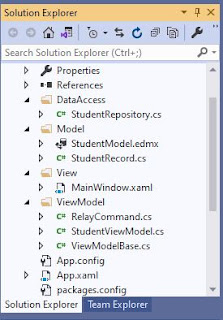
Good day to all! Here's an example of a WPF CRUD (Create,Update and Delete) project using the DataGrid control, ADO.NET Entity Framework 6.x, C#.NET and Model–View–Viewmodel(MVVM) architectural pattern. This post was based from this tutorial WPF CRUD With DataGrid, Entity Framework And C#.NET except that we are now using the MVVM framework. The steps below are pretty straightforward and easy to follow. I. Project Setup 1. Add a table called Students in you database. The complete script is found in this post WPF CRUD With DataGrid, Entity Framework And C#.NET 2. Create a WPF Project and add four folders called DataAccess, Model, View and ViewModel. 3. Your project structure may look similar with the screenshot provided below. II. Coding The Model and Repository Class 1. Inside the Model folder, add an ADO.NET Entity Data Model that connects to the Students table in your database. On my part, I named it StudentModel . 2. For the connectionstring name in App.config file, I ...
Hello, When purchasing a brand new monitor or laptop, it is recommended to check first common monitor issues like dead pixels or backlight bleeding before closing the transaction with the physical store or online shop. One of the existing tools that I comes in handy and I use most of the time is the Dead Pixel Checker by DVANA that is hosted from Microsoft Store that can be installed on Windows 10 or 11 devices. I also recommend this app to my friends instead of the online tools because some of our local computer stores here in Cebu does'not have WIFI connections for us customers to hook up with. To use the software, download and install that in your machine. Once installed, click the Start Testing button to perform the diagnostic test. Your entire monitor screen will be filled first with red and then you may use the left or right cursor keys to select the other pre-defined colors of the tool such as green, blue, white and black to check any issues that may occur. Here...
Good evening gents! Use the shortcut keys below to remove the dotted lines or white spaces in your Visual Studio 2010 IDE: 1. ctrl r+w or 2. ctrl e+s Cheers!

Comments
Post a Comment