ASP.NET MVC WebGrid In Partial View Redirects To Blank Page During Pagination
Hello,
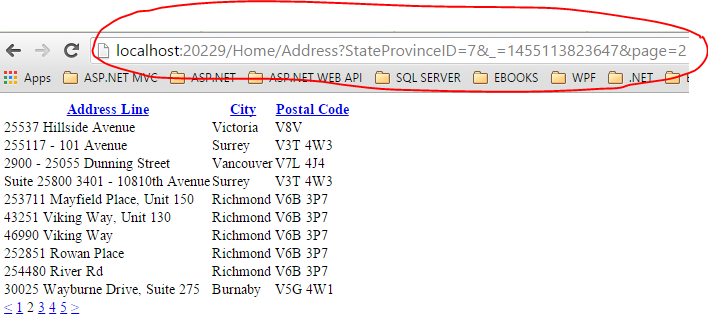
Screenshot:

Updated Code:
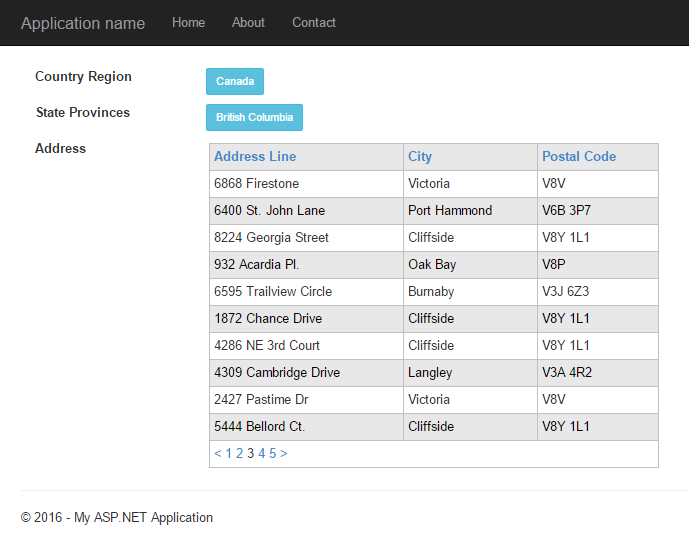
Screenshot:

I've created an ASP.NET MVC website that loads a partial view with a WebGrid control on ajax call. When I tested navigating to next record set, the WebGrid performs a postback and then redirects to a blank page. Not only that, the WebGrid control also lost it's css style. After doing some research on it's properties, I basically encountered a property called ajaxUpdateContainerId. After including that property in the WebGrid control, the pagination works fine and does not redirect to a blank page.
Original Code:
1 2 3 4 5 6 7 8 9 10 11 12 13 14 15 16 17 | @{
var grid = new WebGrid(
canPage: true,
canSort: true,
rowsPerPage: 10);
grid.Bind(Model.AddressList, rowCount: Model.AddressList.ToList().Count);
grid.Pager(WebGridPagerModes.NextPrevious);
@grid.GetHtml(tableStyle: "webGrid",
htmlAttributes: new { id = "grid" },
headerStyle: "header",
alternatingRowStyle: "alt",
columns: grid.Columns(
grid.Column("AddressLine1", "Address Line", canSort: true),
grid.Column("City", "City", canSort: true),
grid.Column("PostalCode", "Postal Code", canSort: true)
));
}
|
Screenshot:
Updated Code:
1 2 3 4 5 6 7 8 9 10 11 12 13 14 15 16 17 18 19 20 21 22 23 | @{
var grid = new WebGrid(
canPage: true,
rowsPerPage: 10,
canSort: true,
ajaxUpdateContainerId: "grid"
);
grid.Bind(Model.AddressList, rowCount: Model.AddressList.ToList().Count);
grid.Pager(WebGridPagerModes.All);
}
@grid.GetHtml(
htmlAttributes: new { id = "grid" },
tableStyle: "webGrid",
headerStyle: "header",
alternatingRowStyle: "alt",
columns: grid.Columns(
grid.Column("AddressLine1", "Address Line", canSort: true),
grid.Column("City", "City", canSort: true),
grid.Column("PostalCode", "Postal Code", canSort: true)
)
)
|
Screenshot:


Really saved my time. Thanks for the blog :)
ReplyDeleteYour welcome!
DeleteGlad that this post was helpful to you.
Cheers! :-)