Posts

Donate

Blazor QuickGrid Component Inside Div Element Overlaps Horizontally

Image
Hello, As I was experimenting with Blazor QuickGrid component, I decided to populate the Grid component with records from WideWorldImporters database and opt to display at least nine columns. Upon rendering on the page, I noticed that the QuickGrid component overlaps horizontally even if it's inside a div element with bootstrap row as it's class. To fix this issue, I added an id attribute to the grid component so I can apply a css style explicitly. <QuickGrid Id= "qGridCustomer" Class= "table table-responsive table-bordered table-striped" Items= "@FilteredCustomers" Pagination= "@pagination" > <PropertyColumn Title= "Customer Name" Property= "@(p => p.CustomerName)" Sortable= "true" > <ColumnOptions> <div class= "search-box" > <input type= "search" autofocus @bind= "nameFilter" @bind: event = ...

Blazor Web App CRUD Project Using Visual Studio 2022, .NET 8 And Entity Framework Core

Image
Good day Team! Here's a basic Blazor Web App CRUD Project using Visual Studio 2022, .NET 8 and Entity Framework Core. The database for this project is SQL Server and the approach to communicate the database is database first. Let's begin. I. Project Setup 1. Open your SSMS editor and execute the create Employee table script that is used in this project into your SQL Server instance. This will be the datasource for our employee information. USE [ASPCoreTestDB] GO SET ANSI_NULLS ON GO SET QUOTED_IDENTIFIER ON GO CREATE TABLE [dbo].[Employee]( [EmployeeID] [int] IDENTITY (1,1) NOT NULL , [EmployeeGovtID] [varchar](50) NULL , [EmployeeName] [varchar](200) NULL , [Age] [int] NULL , [Address] [nvarchar]( max ) NULL , [Salary] [decimal](18, 2) NULL , [Designation] [varchar](50) NULL , [HasDependents] [bit] NULL , CONSTRAINT [PK_Employee] PRIMARY KEY CLUSTERED ( [EmployeeID] ASC ) WITH (PAD_INDEX = OFF , STATISTICS_NORECOMPUTE = OFF , IGNORE_DUP_K...

Add Menu Separator To Notepad++ Using The Notepad++ Plugin Pack In C#

Image
Hello, I'm currently adding modules to my Notepad++ plugin project and we noticed that the menu items are growing. So our architect suggested that it needs to be grouped and using a line separator for organization and proper grouping. At the moment, the menu itmes for the plugin isn't grouped based from the screenshot below. And here's the C# code to add the menu items. internal static void CommandMenuInit() { StringBuilder sbIniFilePath = new StringBuilder(Win32.MAX_PATH); Win32.SendMessage(PluginBase.nppData._nppHandle, ( uint )NppMsg.NPPM_GETPLUGINSCONFIGDIR, Win32.MAX_PATH, sbIniFilePath); iniFilePath = sbIniFilePath.ToString(); if (!Directory.Exists(iniFilePath)) Directory.CreateDirectory(iniFilePath); iniFilePath = Path.Combine(iniFilePath, PluginName + ".ini" ); someSetting = (Win32.GetPrivateProfileInt( "SomeSection" , "SomeKey" , 0, iniFilePath) != 0); PluginBase.SetCommand(0, "Session Laws" , SessionLaws...

Recursive CTE Not Getting Top Level Superseded Parts In T-SQL

Image
Hello, I've been given a task to get the superseded partnumber of a certain part. The scenario is, the chain of the superseded is undetermined and could go as has high as four or more levels. See screenshot below of an example of product supersession. It illustrates that the part supersession of part M03971 is M32887 instead of its direct parent M04880. Trying out the concept of recursive CTE gets only the lowest level instead without it's parent part supersessions. WITH SupersededBy_Cte AS ( SELECT [StdDescID], [PartNumber], [SupersededBY], 0 AS [ level ] FROM [tblStdDesc] std1 WHERE std1.SupersededBY IS NULL UNION All SELECT std2.[StdDescID], std2.[PartNumber], std2.[SupersededBY], cte.[ level ] + 1 FROM SupersededBy_Cte cte INNER JOIN [tblStdDesc] std2 ON std2.SupersededBY = cte.StdDescID ) SELECT cte.[StdDescID], cte.[PartNumber], cte.[SupersededBY], cte.[ level ] FROM SupersededBy_Cte cte WH...

The EXECUTE Permission Was Denied On The Object - SQL Server Function

Image
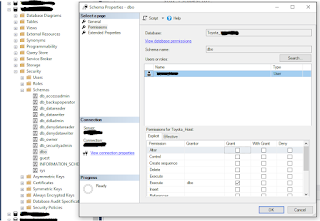
Good day! I just recently restored a new database from the server and ran a script to create a T-SQL function. But when I called that function in C#.NET, it won't allow me to but instead returns a "The EXECUTE Permission Was Denied On The Object" error. To fix this issue, expand the database as to where the function was setup. Then click on the Security node -> Schemas -> dbo. When the Schema dialog opens, add the user name and set it's check the Grant checkbox of the Execute permission. After that, I can now successfully call the function from my .NET application. Cheers!

Font-Awesome Files Not Loading In Blazor Web Application In .NET 8

Image
Hello, As I was integrating the font-awesome library into Blazor Web Application, I noticed that the buttons were not showing the font-awesome icons. Upon checking through the browser console, the files such as fontawesome.css, regular.min.css and solid.min.css were not loaded even though they were referenced in App.razor component such as the code below. <head> <meta charset= "utf-8" /> <meta name= "viewport" content= "width=device-width, initial-scale=1.0" /> <base href= "/" /> <link rel= "stylesheet" href= "bootstrap/bootstrap.min.css" /> <link rel= "stylesheet" href= "app.css" /> <link rel= "icon" type= "image/png" href= "favicon.png" /> <link rel= "stylesheet" href= "~/lib/font-awesome/css/fontawesome.css" /> <link rel= "stylesheet" href= ...

Donate